
Cute Shimee: Anime Screen Pet
EDEO TECH LIMITEDPersonalization
3.917.00 Reviews
- Version
- 1.0.6
- Installs
- 500.00K
- Age Rating
- Everyone
Screenshots
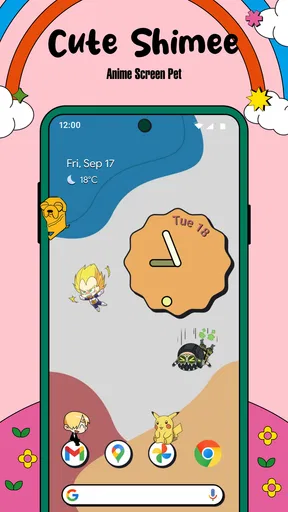
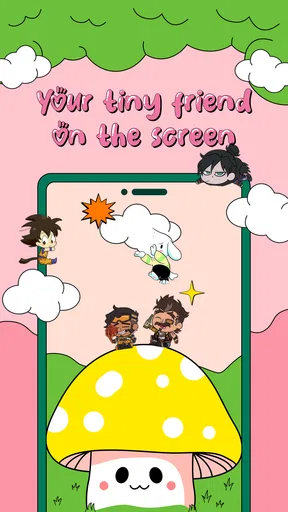
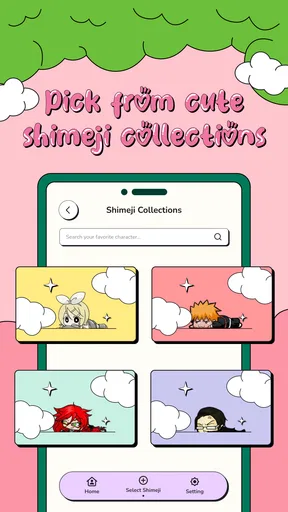
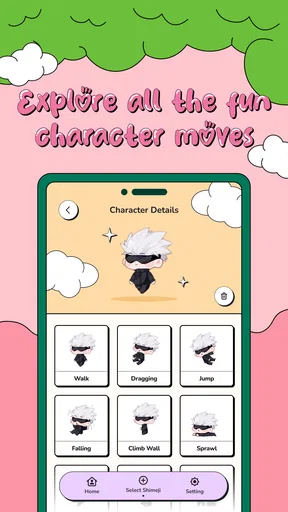
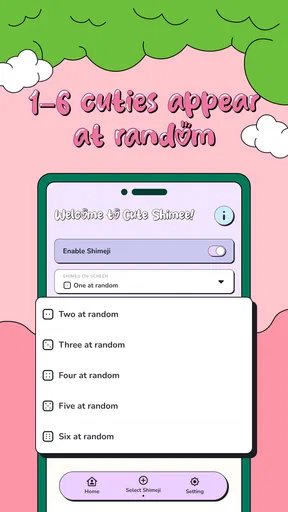
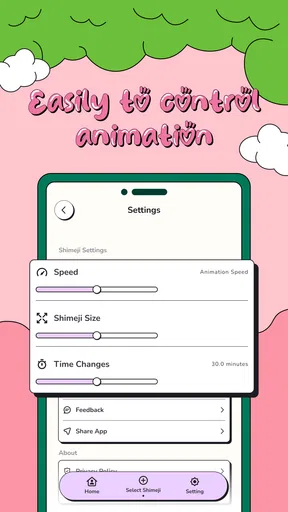
Our Review of Cute Shimee: Anime Screen Pet
 Analysis by Appyee
I noticed Cute Shimee: Anime Screen Pet because it takes a very small idea and puts it directly into the everyday space where I already spend time: the phone screen. Instead of asking me to open a full game or manage another social feed, it focuses on animated anime-style companions that add a little movement and personality to the device. That makes it a personalization app first, rather than a conventional game with levels, missions, or a long progression system.
After using it, my impression is that its appeal depends less on complexity and more on whether you enjoy having a playful visual presence around your other phone activities. I can see the charm in checking a message while a tiny character wanders nearby, but I can also see why someone who prefers a quiet, highly controlled interface might remove it quickly. The experience is deliberately decorative and interactive, so its value is personal: it changes how the phone feels rather than solving a practical problem.
How the screen pet fits into daily phone use
The app comes from EDEO TECH LIMITED and is available free of charge for everyone. Its current version is 1.0.6, and it requires Android 10 or later. Those details matter because this is the kind of app people may install casually, perhaps after seeing the character concept and wanting to try it for a few minutes. The low commitment makes experimentation easy, although the real question is whether the novelty survives normal phone use.
I found the best way to judge it was not to stare at the pet as if it were a standalone game. Its purpose becomes clearer when I leave it present while doing something else. A quick chat, a music session, or a short break from work feels slightly more playful when the animated companion is part of the screen environment. It is a small layer of personalization, not a replacement for a wallpaper collection, launcher, or serious productivity tool.
A realistic example is a commute or waiting-room moment. I might unlock my phone to check a message, notice the character moving around the display, and interact with it briefly before returning to the original task. That short interruption can be pleasant when I want a distraction. On a busy morning, however, the same interruption can feel unnecessary. The app works best as optional background personality, not as something that should compete with every task.
The store presents the app as “Cute Shimee,” but the useful way to understand it is as a screen companion built around anime-inspired charm. I would recommend it most readily to people who enjoy character customization, animated interfaces, and novelty features that make a familiar device feel more personal. Someone looking for a deep game, a useful widget, or a polished replacement for a phone launcher should set different expectations from the start.
Readability and navigation in a character-focused interface
Readability is slightly different here from a normal utility app. The main visual subject is the companion itself, so the screen can become busier than it would be with a static wallpaper. I found that the app’s success depends on whether the character remains a pleasant accent instead of becoming the most noticeable element whenever I am trying to read something else.
For users who prefer clear visual hierarchy, this is an important trade-off. A moving figure can draw the eye more strongly than a still image, especially when it appears near text, icons, or controls. That does not automatically make the app difficult to use, but it means the experience may be less comfortable for people who are sensitive to motion or easily distracted by activity at the edge of the screen.
I would approach setup with a simple test: install it, spend a few minutes reading messages and opening the apps I use most, and watch whether the companion interrupts my attention. If it stays visually secondary, the personalization works. If I keep looking away from the task to follow it, I would treat that as a sign to reduce its presence or choose a static alternative instead.
Navigation also benefits from realistic expectations. This is not the sort of app I would choose because I want many layers of menus, detailed dashboards, or a large collection of productivity controls. Its appeal is immediate and visual. That simplicity can be welcoming for someone who does not want to learn a complicated system, but it may feel limited to users who expect extensive configuration and precise control over every part of the display.
For older users or anyone who prefers larger, calmer interface elements, the companion should be judged alongside the phone’s own display settings. Increasing system text size may help with general reading, but it does not necessarily make an animated overlay or character easier to interpret. I would not install it on a device used mainly for large-print communication unless I had already confirmed that the extra visual layer stayed out of the way.
Motor and sensory considerations before keeping it installed
The interaction model is appealing because it appears designed for brief, informal contact rather than long sessions requiring precise control. That can suit users who want to tap occasionally without committing to a traditional game. It may also be easier for someone who finds complex game controls tiring, since the central attraction is the companion itself rather than a demanding sequence of actions.
At the same time, a screen pet can create a different kind of friction. If the character occupies an area I normally use for tapping, even a small accidental interaction can become annoying. People with tremors, limited dexterity, or difficulty making accurate touches may prefer a calmer personalization option that does not add moving targets or extra visual elements to the screen. I would test it with the phone held in the way I normally use it, not only while the device is flat on a desk.
There is also a sensory question. Anime-style animation and constant movement will be enjoyable for some people and tiring for others. Users who experience discomfort from motion, visual clutter, or rapid changes should be cautious. I would try the app during a normal day rather than deciding after a novelty-focused first impression. A companion that feels cute for five minutes may become distracting after several hours of reading, navigation, or work.
Sound and vibration deserve the same practical attention whenever a personalization app is introduced into daily routines. I would check the phone’s normal volume and notification behavior after installation and use the app in a quiet room, on public transport, and during focused work. Even when the character is visually attractive, it is not worth keeping if it makes the phone feel more demanding than before.
One useful habit is to separate “I enjoy looking at this” from “I can comfortably use my phone with this present.” Those are not always the same. I may like the character during a break but prefer a clean screen while writing, reading, or following directions. Treating the app as something I can temporarily use rather than a permanent layer makes the decision more flexible, especially for users with changing sensory needs.
Situational access: where the app helps and where it gets in the way
The strongest situation for this app is casual personal use. If I want my phone to feel less sterile, an animated anime companion adds more character than a standard wallpaper without requiring me to launch a separate game. It can be a pleasant choice for a personal device used at home, during breaks, or in other relaxed settings where a little visual activity is welcome.
It is less suitable for a phone used in professional or safety-sensitive contexts. During a meeting, a moving companion may appear unprofessional or simply pull attention away from the conversation. While driving, cycling, or walking through busy areas, any decorative screen activity is a poor priority. The app does not make those situations safer, and I would never treat its presence as a reason to look at the phone more often.
Shared devices are another point to consider. On a personal phone, the choice is mine. On a family device, a child may find the character entertaining while another person may find it distracting. Because the content rating is Everyone, the app is positioned for a broad audience, but that does not mean every household will want the same visual style. I would let the regular user decide whether the companion makes the device more comfortable.
The app can also suit people who want a low-pressure form of personalization. Compared with installing a full game, it asks for a smaller emotional and time commitment. Compared with a static wallpaper, it offers more life and presence. Compared with a launcher or theme package, it is narrower: it changes the atmosphere around phone use rather than redesigning the entire interface.
That comparison clarifies who should skip it. If I want battery-conscious minimalism, a distraction-free reading experience, or a phone that looks identical every time I unlock it, a static background is probably better. If I want a character-driven game with clear goals and a sense of progress, I would choose a dedicated game instead. If I want accessibility controls, large navigation targets, or a simplified home screen, I would look toward system settings or an accessibility-focused launcher rather than expecting this app to provide them.
Practical barriers that may decide whether it stays
The biggest barrier is not the basic concept; it is tolerance for an extra layer on the screen. Some people love ambient animation, while others experience it as clutter. That difference is especially important for users who already rely on a carefully organized home screen, magnification, high-contrast settings, or a strict visual routine. A charming companion can still interfere with those habits if it draws attention at the wrong moment.
Another barrier is the gap between novelty and lasting usefulness. The first session is easy to enjoy because the idea is unusual, but personalization apps need to fit naturally into repeated phone use. I would give it a fair trial across several kinds of activity: reading, messaging, watching content, and using the phone quickly while standing. If the character remains pleasant across those contexts, it has earned a place on the device. If not, uninstalling it is a sensible outcome rather than a failure.
People who depend on predictable visual layouts should be particularly careful. A static wallpaper never changes position or behavior, whereas a screen companion is valuable precisely because it feels active. That activity may make the phone warmer in attention even when it does not make the task itself better. For me, the deciding question is whether the pet adds emotional comfort without reducing the clarity of the apps underneath it.
I would also avoid assuming that a broad age rating automatically answers every accessibility question. “Everyone” makes the app easy to consider for a family audience, but individual needs still vary widely. A child who enjoys animation may be comfortable with it, while someone with sensory sensitivity may prefer less movement. An adult with motor difficulties may appreciate a simple concept but still struggle if the character affects touch accuracy. These are personal tests, not problems that a label can settle.
My practical advice is to install it during a low-pressure period, use it with the same display size and phone grip I normally rely on, and remove it if it makes ordinary tasks slower. I would also keep a static wallpaper ready as a fallback. That comparison reveals the real cost of the app: not its download price, which is free, but the attention and screen space it asks me to share with the rest of the phone.
What the current reception suggests
The app has passed the early curiosity stage with over 500 thousand installs, while its average rating sits at 3.9 from more than 200 ratings. I read that combination as a sign of interest with room for refinement rather than universal approval. The concept clearly attracts people, but a personalization app can produce divided reactions because animation, appearance, and interference with normal phone use are highly subjective.
The review count is in the tens, which makes individual reactions less useful as a complete verdict. I would focus more on whether the app fits my own habits than on expecting a broad consensus. A person who wants a cute animated presence may find it delightful, while someone who values a clean interface may reach the opposite conclusion after the same short test.
Since the app is at version 1.0.6, I would approach it as a relatively early experience and keep expectations realistic. That does not make it a poor choice; it simply means I would judge the current behavior rather than assume it already offers the depth of a mature personalization platform. Users who enjoy trying focused apps early may appreciate that simplicity, while users who need extensive polish and predictable controls may prefer an established alternative.
My inclusive verdict for different users
I like the idea because it gives personalization a more companion-like feeling than a wallpaper, yet it remains much lighter than installing a full game. For me, the strongest use is occasional: I can enjoy the anime character during relaxed phone time and switch back to a quieter setup when I need concentration. That flexible role makes more sense than expecting it to improve productivity or replace accessibility tools.
I would recommend it to anime fans, people who enjoy playful interfaces, families looking for an uncomplicated visual novelty, and anyone who wants a free way to make a personal phone feel less ordinary. I would recommend a cautious trial for users with motion sensitivity, limited touch precision, reading difficulties, or a strong need for visual consistency. The app may still work for them, but only if its presence remains subordinate to the phone’s primary tasks.
I would skip it if my priority were a distraction-free screen, a highly configurable launcher, a static visual environment, or a game with meaningful progression. Those needs point toward different categories, and no amount of cuteness can compensate for a mismatch in purpose. The fact that it is free lowers the risk of trying it, but it does not remove the need to evaluate comfort and attention.
Overall, Cute Shimee: Anime Screen Pet is a focused personalization app with a clear emotional appeal and a narrow job. It succeeds when the moving companion feels like a friendly accent rather than an obstacle. Its Everyone rating and free access make it approachable, while the 3.9 average shows that the experience will not suit every phone or every user equally. I would try it for the charm, test it across real routines, and keep it only if the character makes the device feel more enjoyable without making the important parts harder to see, reach, or use.
Verdict
Strengths of Cute Shimee: Anime Screen Pet
- Adorable anime characters add personality to your phone screen.
- Pets are easy to place and move around the display.
- Lightweight app with a simple, beginner-friendly interface.
- Multiple character styles offer variety for anime fans.
- A fun novelty that can make routine phone use more enjoyable.
Limitations of Cute Shimee: Anime Screen Pet
- Screen pets may cover buttons or text while using other apps.
- Some characters and features may require in-app purchases.
- Animations can become distracting during work or gaming.
- The app may need overlay permissions to appear above other apps.
- Battery usage may increase slightly when pets stay active.
Similar Picks in This Category
View All
Microsoft SwiftKey AI Keyboard
SwiftKey4.3

Wallpapers
Google LLC4.1

Zedge™ Wallpapers & Ringtones
Zedge4.7

Yandex Browser with Alice AI
Direct Cursus Computer Systems Trading LLC4.3

Ringtone Maker:create ringtone
Big Bang Inc.4.7

Fonts Keyboard
Fonts Keyboard3.9
Frequently Asked Questions
What is Cute Shimee: Anime Screen Pet?
Cute Shimee: Anime Screen Pet is a customization app that places an animated anime-style companion on your device’s screen. The character can appear over other apps, react to touches or interactions, and provide a playful visual experience. It is designed mainly for users who enjoy anime aesthetics, virtual pets, and personalized phone screens rather than for productivity or communication.
How does Cute Shimee: Anime Screen Pet work on a phone?
After installation, the app generally requires permission to display its character over other applications. Once enabled, the Shimee can move around the screen while you use your phone, depending on the options available in the app. Users can usually adjust the character’s behavior, position, or visibility. Because it runs on top of other apps, reviewing the permission settings is important before activating it.
Is Cute Shimee: Anime Screen Pet safe to install?
The app should be downloaded from a trusted official store and checked for its listed developer, permissions, ratings, and recent user reviews. Screen-overlay applications need special access to appear above other apps, which is normal for this type of tool but should still be understood. Avoid granting unrelated permissions, and uninstall the app if it behaves unexpectedly, displays excessive advertising, or affects normal device performance.
Will Cute Shimee: Anime Screen Pet drain battery or slow down my device?
The impact depends on the character’s animation frequency, how long the overlay remains active, your device’s hardware, and the app version. A small animated companion may use additional battery and memory, particularly on older phones or when other demanding apps are running. If you notice increased battery consumption, lag, or overheating, reduce animation activity, disable the overlay temporarily, or close the app.
Does Cute Shimee: Anime Screen Pet work on iPhone and Android?
Availability and functionality can differ considerably between Android and iOS. Android devices commonly support floating screen companions through overlay permissions, while iOS places stricter limits on apps that remain visible over other applications. Before downloading, check the official store listing for your device, supported operating-system versions, in-app purchase details, and whether the advertised screen-pet features are available on your specific platform.
